

Author Archives: Melissa A. Venable

Unknown's avatar

About Melissa A. Venable

Working at the intersection of instructional design and technology, social media, and career development.

Year 3 – Blogging in 2011

First off, thank you for stopping by and for contributing your comments and replies throughout 2010! Your time here is always appreciated and I look forward to more conversations in 2011. As of this month, the Design Doc blog is two years old! As we enter year three, I just wanted to use one post to revisit past goals and look forward to this coming year.

Goals for 2010 included:

  • Blogging more frequently and
  • Learning more about blogging and WordPress.

While I didn’t blog every week, as hoped, I did manage to add 40 new posts over the course of the year. I also was fortunate enough to attend both WordCamp Miami and BlogWorld and New Media Expo. Two very different but equally fantastic events! (Find a WordCamp near you and look for BlogWorld in the fall.)

I also presented at three conferences in 2010 on blog-related, social networking topics – in each of these presentations I encouraged my colleagues in instructional design to think about blogging in two ways: 1) as a way to share their work, lessons learned, tips and tools of the trade, and 2) as a resource for information from other instructional designers using the blog format to share their experiences.

These are the posts that got the most views in 2010.

  1. Figuring Out Facebook
  2. Instructional Design Documents
  3. Course Design – Start with an Outline

So, looking ahead to 2011 there are a few new targets to hit:

  • Refine topic areas. – You’ll be seeing more about career development and professional opportunities for instructional designers this year, as well as more in terms of practical tips and resources.
  • Make the move to WordPress.org. – I have been ready to do this for a while, just need to make the leap and get everything set up. More to follow on this.

Working on this blog opened up a number of opportunities this past year – including being a part of the South Florida Public Media Camp and working with two local artists on a grant writing project. I hope to continue participating in local events and joining more blogging and social media groups.

Here are a couple of resources I’ll be referring to throughout the year. You might also be interested:

So here we go… Please let me know what might be helpful to you as we move forward. And please continue to join in the conversations!

Photo credit: Stock.xchng

Create and Share Your Own Images

One of the many tasks involved in preparing content for delivery is locating and selecting appropriate images. Whether you are writing a blog post or developing a full academic course, images (drawings, photographs, charts, etc.) help tell a story, help to get the message across.
Where do you find images?

You may be lucky enough to have a graphic artist in-house or maybe a subscription to a stock images resource. But if you’re on a budget, you may be looking for other options – images that are available online with no fee for use. Creative Commons (CC) licenses are a popular way for photographers to make their work available for you to use. Here are a couple of ways to search for CC licensed images: Flickr and the Creative Commons search page.

Do you have images to share?

If you are interested in contributing, you can do so by creating your own online account and making your photos available – searchable and clearly labeled with your intent for their use. One option is @DailyShoot:

The Daily Shoot is a simple daily routine to motivate and inspire you to practice your photography, and share your results! It’s not a contest and there are no prizes. It’s simply about encouraging you to pick up your camera and make photographs.

Everyday @Dailyshoot tweets an assignment – an idea, a topic, to focus your efforts. You tweet a link to your photo for that assignment that includes the day’s hashtag, and it is linked to the site. For more about how it works, check out The Daily Shoot. If you post one photo per day you would end up with 365 contributions by the end of the year (next year, that is)! Even one per week would result in a gallery of 52. As a consumer of CC licensed images, now I can contribute to the pool.

Most of The Daily Shoot participants don’t post every day, but a couple do. You can browse their past photos on the site. It’s also interesting to see the differences and similarities in approach to each day’s assignment. As an example, take a look at 12/26/10 – “What fuels your creative process?”

I heard about this project at a conference in September and have wanted to give it a try ever since. Armed with a brand new camera (thanks, Adam!) I just started yesterday. I’ll be contributing via my Flickr stream.

Are you already sharing your images? If so, please let us know where! If not, consider joining in.

Image credit: gywst

Update! (12/3/11) The Daily Shoot decided to cease operations several months ago, but fortunately the organizers made their list of of prompts available via Google Docs: Daily Shoot Assignments. I managed to complete 150 assignments in the past year and have now maxed out my free Flickr account. While I consider upgrading to “Pro” I’m looking for a new source of prompts….any ideas? Please share them here!

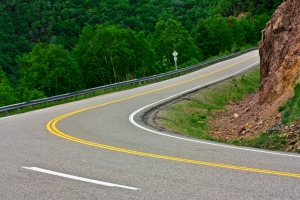
Taking Your Work on the Road

Sometimes a change of venue can be a welcome thing. I found this to be the case during a recent week of working from the road over the holidays. It can be a boost to productivity and a nice change of pace if you think about the logistics a little in advance and plan accordingly.

Location, Location, Location

Finding wireless Internet access in advance is a must and it helps to have multiple options in mind. I had great success in coffee shops, fast food restaurants, and public libraries and broke the day up so that I was usually one place in the morning, then took a break for lunch before settling in at another location for the afternoon. Be a good patron! These places, especially the coffee shops, are busy and popular – poor form to take advantage of the wireless without being a good customer.

The Ballet of Battery Life

Not all of the locations above were equal in terms of availability of outlets/power strips. It took me a couple of days to scout out the prime seats (close to outlets) in all of these locations to plug in my laptop. Don’t forget the cell phone chargers! If you’re on the phone a lot, like I am, these batteries will need attention, too.

Joining Conference Calls and Online Meetings

Become a master of the mute button. This comes in really handy in noisier locations. If you have a headset for your phone or computer I’d recommend packing it. I left mine at home thinking it would be just another thing to carry but regretted that. In especially noisy places I found outdoor tables and even my car to be effective refuge locations for calls.

Adapt and Overcome

Back at home now, I have a new appreciation for the luxury of multiple monitors and the proximity of my own kitchen. My home office is a controlled and stable environment, but on the road be ready to adjust your location as needed and quickly, especially when preparing for conference calls. Murphy appears frequently, and seemingly out of nowhere, in the form of landscaping crews with leaf blowers, rainstorms, and school kids on field trips.

You Won’t Be Alone

I ran into plenty of folks doing the same thing I was doing – oddly comforting. We shared info about access keys and outlets, and watched each others’ stuff when someone needed a break.

For more information…

Want to find out more about working away from the (home) office? Check out the following:

Do you have experience workshifting? Share your advice and lessons learned.

Image credit: stock.xchng